The Fold Is the Brief: How iPhone Duo Is Rewriting Mobile UX
By Mobina
iPhone Duo has a 5.4-inch outer screen, a 7.6-inch inner one, and at least four realistic ways to hold it. It goes on sale October 23. Most teams will treat that as layout work. From a product seat, it's a requirements problem, because every pose tells you what the person is doing. This piece introduces the Posture Brief, a four-line spec for each key flow. It also offers a three-tier plan for deciding how much to build while foldables are still a small slice of the market.
Apple's design team explained its first foldable with a coffee-table book. Spread a photo across two pages and the picture falls apart near the spine. Interface elements that cross the fold of iPhone Duo behave the same way. Of everything in the launch, that one analogy is the most useful product requirement. It isn't about pixels. It's about what someone is doing with the thing in their hands.
Four Poses, Four Briefs
| Pose | What It Signals | What the Screen Should Do |
|---|---|---|
| Closed (5.4" outer) | Quick, one-handed, in motion | Glanceable status, one clear action |
| Open (7.6" inner) | Settled, focused, two hands | Show more: sidebars, two columns, side by side |
| Book (half-folded, held) | Reading or comparing | Keep content out of the crease, split main and detail |
| Propped (half-folded on a table) | Hands busy, viewing from a distance | Content on the top half, controls on the bottom |
What Is iPhone Duo?
iPhone Duo is Apple's first foldable, unveiled September 9, 2026. It's about the size of a passport when closed. It has a 7.6-inch inner display and a 5.4-inch outer one, starts at $1,999, and goes on sale October 23 in 70 countries. It runs on the A20 Pro chip and Siri AI. It uses Touch ID on the power button instead of Face ID, and Apple Pencil support is coming after launch. When it's open, it can run two apps side by side, or two windows of the same site for something like comparison shopping.
None of the hardware ideas are new. Samsung shipped the first mainstream foldable seven years ago. What's new is the audience.
Foldables are under 2 percent of global smartphone shipments, and IDC expects Apple to capture roughly a third of foldable demand with this one device.
Why the Fold Changes UX
On iPhone Duo, the shape of the screen tells you what the person is doing. That makes it a product requirement before it's a layout one.
Apple's engineering guidance makes the break with old habits explicit. The outer display behaves like any other iPhone. The inner display is regular-width in both directions, which leaves room for sidebars, and it ignores the orientations your app says it supports. Apple's advice is to stop making layout decisions based on orientation and use size classes instead. That alone retires a decade of "portrait first, landscape if we have time" specs.
The more interesting part is in the design talk. Apple's designers say the right place for content changes with how the device is being used. When it's half-folded and held like a book, alerts move to the trailing side, closer to where they'll reappear once the phone closes. When it's propped on a table, the top half suits things you read from a distance and the bottom half suits controls you tap.
Read that again as a PM. Those aren't layout rules. They're assumptions about intent, written down.
| Screen-Size Thinking | Posture Thinking | |
|---|---|---|
| The question | How much space do I have? | What is this person doing right now? |
| The spec | Breakpoints and grids | One requirement per pose, per flow |
| The test | Does it fit? | Does it still make sense mid-fold? |
The Posture Brief
Call it the Posture Brief: for every flow that matters, write one line per pose. Each line answers the same four questions:
- 1.What is the person doing in this pose?
- 2.What has to stay visible?
- 3.What's allowed to move?
- 4.What has to survive the transition?
The fourth question is the one most specs will miss. Opening or closing iPhone Duo resizes your app, the same way iOS 27 already lets people resize iPhone apps through iPhone Mirroring on the Mac. Say someone starts a checkout form on the outer screen and opens the phone to finish it. The form, the scroll position and the half-typed address should all be exactly where they left them. That's an acceptance criterion, not a polish item.
Here's what a brief looks like for a flow most of us have used: tracking a delivery.
| Pose | Person Is... | Must Stay Visible | Can Move | Must Survive |
|---|---|---|---|---|
| Closed | Checking on the go | ETA and courier status | Map shrinks to a thumbnail | Live tracking state |
| Open | Settled, has a minute | Map and order details side by side | Help and receipts into a sidebar | Scroll position in the item list |
| Book | Comparing or reading | Map left, items right, nothing on the crease | Alerts to the trailing side | Selected item |
| Propped | Cooking, hands full | Large ETA on the top half | Call and message buttons to the bottom half | Any open message thread |
(Full disclosure: when the keynote compared the Duo to a passport, I rolled my eyes. Then I realized it's the most honest line on the spec sheet. This is a pocket device that sometimes becomes a table device, and the brief should be weighted that way.)
What Breaks on Foldables
Most foldable bugs aren't really foldable bugs. They're old assumptions that a single-shape screen let us get away with.
Apple's first recommendation is to audit centered layouts. Content and controls that sit across the fold become hard to see once the device bends. Code that refers to "the main screen" becomes ambiguous on a device with two displays, and Apple plans to deprecate it. Safe areas are often lopsided too. Vertical toolbar buttons can end up on the left edge in sideways and Split View layouts, so anything that assumes equal insets on both sides will misalign. Apple also warns against moving continuously scrolling content like feeds and articles around the fold, since scrolling already absorbs the change.
| What Breaks | What the Person Sees | The Fix |
|---|---|---|
| Centered modal or hero across the crease | A button split by the fold | Move it to the region that matches its purpose |
| Orientation-based layout logic | The wrong layout on the inner screen | Use size classes |
| Symmetric inset math | Content clipped behind vertical bars | Handle each edge independently |
| State tied to the view | A form that resets when the phone opens | Persist state through every resize |
| Displaced feeds and articles | Jumpy, disorienting reading | Leave scrolling content alone |
Every row in that table is a QA case before it's a design task. That's useful framing when you're negotiating scope.
Is iPhone Duo Worth Designing For?
Yes, up to a point, and the point is measurable.
CCS Insight's chief analyst puts foldables at under 5 percent of the overall smartphone market. Early reaction to a roughly $2,000 first-generation device has also been split, with plenty of people saying they'll wait for a cheaper, more refined version. No roadmap should be rebuilt around a device most of your users won't own this year.
The cost curve is friendlier than it looks, though. Existing apps run on iPhone Duo without a rebuild, and each newer SDK claims more of the screen automatically. Standard containers like split views, tab bars and sheets adapt to every pose on their own. That makes the decision a tiered one:
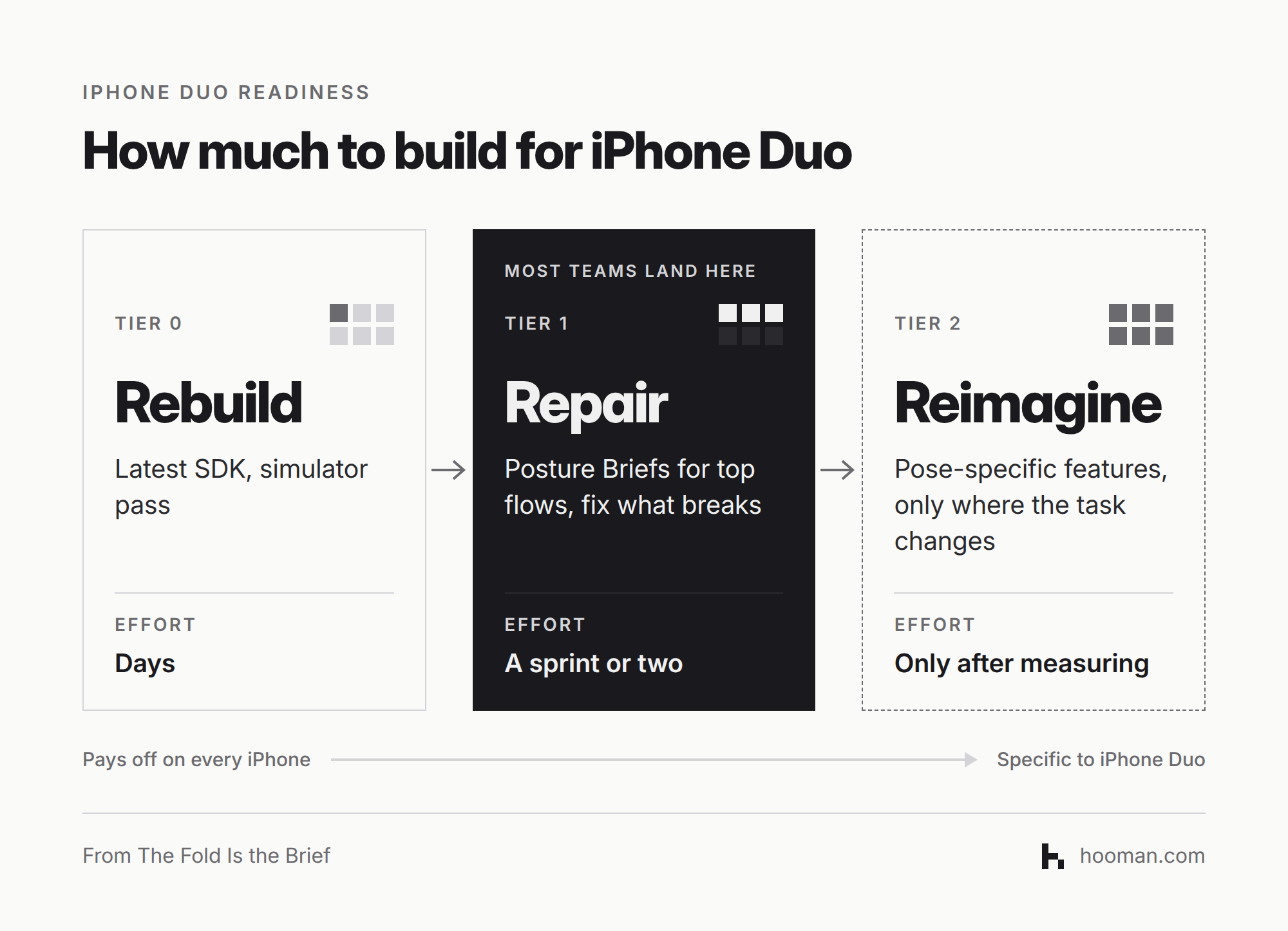
The Repair tier pays off well beyond foldables. iOS 27 already lets people resize iPhone apps larger than ever through iPhone Mirroring, and it's the first release to put two apps side by side on an iPhone. Fixing your assumptions for Duo fixes them there too.
Reimagine is where discipline matters. Apple provides a separate API for reacting to the device's fold state. That means you can log which poses people actually use before you fund pose-specific features. Apple is also selling a kickstand folio at launch, which makes hands-free uses like video calls, recipes and timers realistic. Realistic isn't the same as proven for your product, though. Measure first, then build.
How to Prepare Your App
The iPhone Duo Readiness Checklist
- 1.Rebuild with the iOS 27.1 SDK and run every key flow in the simulator. Xcode 27.1's DeviceHub lets you open, close, rotate and fold a simulated iPhone Duo.
- 2.Write a Posture Brief for your top three flows before anyone opens Figma.
- 3.Audit centered layouts and anything that crosses the fold, using Apple's Designing for iPhone Duo guidelines.
- 4.Replace orientation checks and main-screen references with size classes and scene-based values. Prepare your app for iPhone Duo walks through each of these changes.
- 5.Add "state survives open and close" to your acceptance criteria.
- 6.Log pose usage before building anything from Apple's adaptive layout talk that goes beyond repair.
If you're mid-build, this checklist slots into the design and QA stages covered in our mobile app development guide. Also remember the fastest pose of all, the one where nobody unfolds anything. Duo ships with Siri AI, so the quick, closed-screen tasks in your Posture Brief are also candidates for the App Intents work we covered in Siri Can Use Your App Now. Is It Ready?. Our breakdown of what AI actually does in mobile apps is a good filter for which of those are worth building.
The fold doesn't hand you more pixels. It hands you context. Design for what the person is doing, and the screen size takes care of itself.
Before your next mobile release, write a Posture Brief for your three most-used flows and see which pose breaks first.
FAQ
iPhone Duo is Apple's first foldable iPhone, announced September 9, 2026. It has a 5.4-inch outer display and a 7.6-inch inner display, starts at $1,999, and goes on sale October 23 in 70 countries.
Yes. Apps run without being rebuilt. When the phone is closed, they use the screen area beside the status bar and camera. When it's open, they appear at a familiar iPhone size. Rebuilding with the iOS 27.1 SDK lets an app reach the full edge of the screen.
There are four practical poses: closed, open flat, half-folded and held like a book, and half-folded and propped on a table. Apple's guidance treats the last two differently. In the book pose, alerts move toward the trailing side. In the propped pose, viewable content goes on the top half and controls go on the bottom.
A Posture Brief is a short product spec that gives each important flow one line per pose. Each line answers four questions: what the person is doing, what must stay visible, what can move, and what must survive the transition between poses.
Prioritize the cheap tiers. Foldables are still under 5 percent of the smartphone market, so pose-specific features should wait until you've measured real usage. Rebuilding with the latest SDK and fixing layout assumptions, though, also improves your app for resizing and side-by-side apps on standard iPhones.
Use the iPhone Duo simulator in Xcode 27.1's DeviceHub. Its on-screen controls open, close, rotate and fold the simulated device, so you can check every pose before you have real hardware.