How to Make an App in 2026
By Mobina, Alireza, Casper and Hooman
Most apps fail before launch. Not because the idea was bad. Because the process was rushed. Founders jump in before validating, features pile up, the tech stack becomes difficult to maintain, and six months later the team realizes they built something nobody actually needed. This guide breaks down the 7-phase process Hooman Studio uses to take a product from idea to scalable launch without the technical debt that kills most MVPs. Strategy, design, architecture, QA, and post-launch growth, all in one place.
Most apps fail long before launch.
Not because the idea was terrible. Usually because the process was rushed.
Founders jump into development too early. Teams skip validation. Features pile up. The tech stack becomes difficult to maintain. Then six months later, everyone realizes they built something users don’t actually need.
Building an app in 2026 looks very different than it did even a few years ago.
AI-assisted workflows are speeding up development cycles. Users expect cleaner onboarding, faster performance, and smarter personalization. At the same time, app stores are more competitive than ever, and acquisition costs continue to rise.
That means successful apps need more than good UI.
They need:
- clear product strategy
- scalable architecture
- thoughtful UX
- strong onboarding
- reliable analytics
- fast iteration cycles
- and infrastructure that will not collapse when growth arrives
This guide breaks down the 7 phases we use at Hooman Studio to help founders move from idea to launch without creating unnecessary technical debt along the way.
Here’s a quick overview of the 7 strategic phases we use to turn an idea into a scalable digital product:
- 1.Phase 1 - Strategic Pre-flight: Validating your "Why" and defining the core business case. This is where we stop the guesswork.
- 2.Phase 2 - Human-Centric Design (HCD): Moving from sketches to a pixel-perfect, testable prototype in Figma.
- 3.Phase 3 - The Technical Blueprint: Selecting a battle-tested tech stack like React, Next.js, and Sanity for speed, security, and scale.
- 4.Phase 4 - Agile Development & Transparency: Building the app in predictable sprints, with real-time progress tracking.
- 5.Phase 5 - Quality Assurance (QA): Uncovering issues early with exploratory.
- 6.Phase 6 - Deployment & Launch: Mastering App Store Optimization (ASO) and achieving strategic, compliant launch.
- 7.Phase 7 - Post-Launch: The Art of the Scale: Iteration, maintenance, and planning for growth.
Phase 1: Validate the Problem Before You Build the Product
Most founders naturally focus on the solution first.
The better approach is to spend time understanding the problem deeply enough that the right product direction becomes obvious.
That does not mean months of endless research.
It means validating three things early:
- 1.Is the problem real?
- 2.Do enough people care about it?
- 3.Will they consistently return to your product?
Skipping this phase is one of the fastest ways to waste budget during development.
If you want a breakdown of how ideas turn into real products, we’ve mapped the full our process for startup development here.
What Validation Looks Like in 2026
Modern validation is faster than it used to be.
Today, teams can use:
- AI-assisted user interviews
- prototype testing
- lightweight landing pages
- waitlists
- usability recordings
- Reddit and community research
- competitor review analysis
- analytics simulations
before writing production-level code.
Competitive Analysis That Actually Helps
Do not just study successful competitors.
Look at where users are frustrated.
One-star reviews are often more useful than five-star reviews because they reveal:
- onboarding friction
- slow performance
- broken workflows
- pricing frustration
- missing features
- support issues
Patterns matter more than isolated complaints.
If hundreds of users are struggling with the same experience, there is usually an opportunity there.
| Analysis Type | Focus/Goal | Key Insight |
|---|---|---|
| Audit 1-Star Reviews | Identify key pain points users consistently complain about. | Reveals strategic gaps like slow performance, clunky onboarding, or missing core features. |
| Indirect Competitors | Identify who users turn to when they cannot use your competitor's app. | Reveals untapped user flows by understanding user workarounds. |
User Persona Mapping: Designing for Your Human-First Audience
You cannot design for everyone. You must design for someone specific.
- The Persona Deep Dive: Define who your primary user is, not just by demographics, but by their tech literacy, their motivation for using the app, and their emotional state when they encounter the problem. This is foundational to the human-first approach.
- Jobs-to-be-Done (JTBD): People don't buy a drill bit; they buy a quarter-inch hole. What job is your user hiring your app to do? Focus on that core outcome.
Defining the Commercial Blueprint
Once validated, you need a plan to measure success.
North Star Metric (NSM): The Single Goal That Matters
Your NSM is the single most important metric that captures the value your product delivers to customers. It aligns your entire team.
- E-commerce: Weekly Transactions Completed.
- Communication Tool: Daily Active Teams Sending Messages.
- Utility App: Weekly Successful Task Completions.
Monetization Strategy: Where the Money Is
How will the app fund itself? This choice dramatically influences design and feature prioritization.
- Subscription (SaaS): High-predictable revenue, but requires high engagement and value delivery.
- In-App Purchases: Best for utility or productivity features.
- Ad-Supported: Requires massive scale and usually sacrifices user experience (human-first design suffers here).
Ready to validate your idea?
Talk to a Hooman Strategist about our App Idea Validation aproach. We’ll help you find your NSM and build a rock-solid business case for scalability.
Phase 2: Human-Centric Design (HCD)
Good product design is not decoration.
It is decision-making.
The goal is to remove friction before development even begins.
By the time engineers start building, the team should already understand:
- user flows
- navigation logic
- onboarding steps
- edge cases
- empty states
- accessibility considerations
- and core interactions
This dramatically reduces expensive revisions later.
From Napkin Sketch to Interactive Prototype
This is the phase where we prevent the "janky MVP" syndrome. By rigorously testing the design before development, we cut down on costly code rewrites.
Wireframing (Structure): The Skeleton of the App
Wireframes are low-fidelity. They focus solely on:
- Information Architecture: Where does content live?
- User Flow: The step-by-step path the user takes to complete a task.
- Hierarchy: Which elements are most important on the screen?
High-Fidelity Prototyping in Figma: Making it Feel Real Early
This is where structure gains form, brand, and interaction. We recommend using Figma because it is the industry standard for collaborative, pixel-perfect design systems. A high-fidelity prototype looks and feels like the final app, allowing you to:
- 1.Conduct Usability Testing: Put the prototype in front of real users (your personas) and watch them try to complete core tasks.
- 2.Gather Realistic Feedback: Since the prototype looks real, the feedback is about functionality and clarity, not abstract concepts.
- 3.Ensure Pixel-Perfect Code: The transition from Figma to the React/Next.js development team is seamless, ensuring the final product matches the approved design system perfectly.
Why Prototyping Matters More in 2026
Modern users expect polished experiences immediately.
Even early-stage products are now competing against apps with:
- AI-powered personalization
- highly refined onboarding
- smooth animations
- instant feedback loops
- and fast interfaces
That is why interactive prototyping matters.
Tools like Figma help teams validate usability before engineering resources are heavily committed.
Testing a prototype with real users early often reveals issues that analytics alone cannot catch.
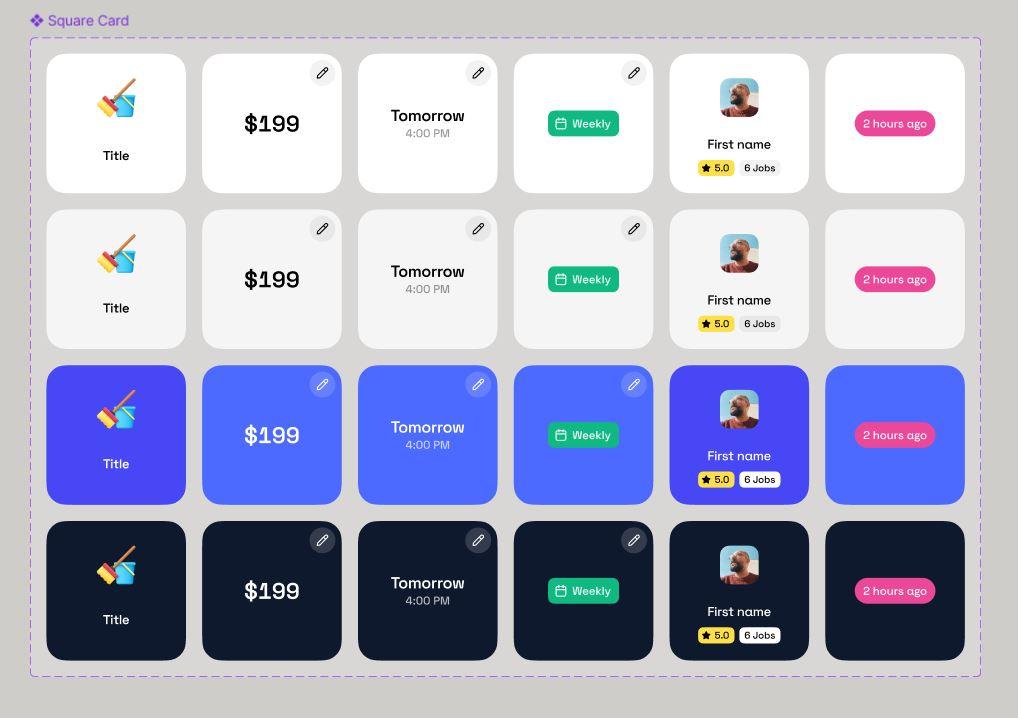
The Art of the Design System
A Design System is the single source of truth for every button, color, font, and interaction. It’s a living library that pays massive dividends down the road.
Why a Custom Design System is Not a Luxury (It's Scalability)
A custom design system built within Figma ensures consistency across your app and any future products. If you change your primary brand color, you change it once in the system, not across 500 lines of code.
Microinteractions and Branded Delight
This is where the personality shines. Microinteractions* are vital to making an app feel high-quality and human.
- Example: For Aikenka Matcha, we crafted specific micro-interactions that evoked the grounded elegance of Japanese minimalism, reinforcing their brand value with every small action.
*Microinteractions: the subtle animations when you refresh a page, click a button, or receive a notification
Phase 3: The Technical Blueprint
Now we get to the core: the stack. In 2026, the tech landscape is clearer than ever, prioritizing speed, maintainability, and ultimate scale.
Stack Selection in 2026: Performance, Cost, and Scale
One of the most expensive mistakes in app development is choosing technology based only on short-term speed.
The fastest launch is not always the most sustainable product.
In 2026, scalable app architecture usually prioritizes:
- cross-platform compatibility
- fast frontend performance
- modular infrastructure
- API-first systems
- AI integration readiness
- maintainability
- and lower operational overhead
| Method | The Quick Take | Hooman Studio’s Strategic Take |
|---|---|---|
| Native (Swift/Kotlin) | Highest possible performance. Requires maintaining two separate, expensive codebases. | Best reserved for gaming, advanced AR/VR, or intense resource processing. Slowest time-to-market for standard business apps. |
| Hybrid (e.g., Cordova) | Single codebase. Performance often feels sluggish. | We steer clear. Results in compromises, poor UX, and technical debt. You always pay the price later. |
| Modern Universal (React/Next.js) | Single codebase. Near-Native performance, faster time to market, and easier scaling. | Our standard. We build highly optimized Progressive Web Apps (PWAs) or utilize frameworks like React Native, backed by Next.js for the core architecture. It gives you performance and a cohesive, battle-tested tech codebase. |
Why React and Next.js Still Dominate
React and Next.js remain popular because they balance flexibility, performance, and ecosystem maturity.
For most startups and modern businesses, they allow teams to:
- ship faster
- reuse components efficiently
- scale features gradually
- improve SEO performance
- and maintain cleaner development workflows
For mobile apps, React Native continues to reduce development complexity for teams that want a shared cross-platform foundation.
Backend Architecture and Content Flexibility
The backend is the brain. It needs to be flexible, secure, and ready for rapid content updates.
Decoupling with a Headless CMS
Your content management system (CMS) should not be shackled to your front-end code. Preferred headless CMS alternatives such as Sanity, Contentful, or Strapi offer modern solutions that effectively decouple content management from the front-end presentation layer. This separation provides developers with greater flexibility and allows content creators to manage content independently of the technologies used for the user interface.This means:
- 1.Marketing content (text, images, and new pages) can be updated independently of the app's core code.
- 2.Performance is maximized because the app only fetches essential data, leveraging the efficiency of JAMstack architecture.
- 3.This architectural choice is fundamental to building low-maintenance systems that operate reliably with minimal oversight.
Security First: Planning Authentication and Data Integrity
A scalable app is a secure app. You should plan authentication (Oauth, JWTs), database protocols, and data encryption from Phase 3, not as an afterthought. Security is baked into the architecture using the best practices of the React and Next.js ecosystem.
Phase 4: Agile Development & Real-Time Transparency
With the strategy and blueprint complete, it's time to build the engine. We highly recommend utilizing an agile methodology, breaking the entire project into 1-2 week "sprints." This allows for continuous testing, fast pivots, and predictable budgets.
Agile isn't just a buzzword; it's a process for delivering value faster.
| Step | Goal | Hooman Recommended Approach |
|---|---|---|
| Planning | Define features for the next 1-2 weeks. | We prioritize based on the NSM and user flow defined in Phase 1. |
| Development | Build, integrate, and internally test the features. | Leverage the Figma design system for component accuracy. |
| Review | Client demo and feedback session. | You see a tangible, working piece of the app; no abstract progress reports. |
| Retrospective | Team review of process efficiency. | We continuously improve our own workflow, ensuring the next sprint is smarter. |
The Stress-Free Client Experience
Effective collaboration with any development partner hinges on complete transparency and real-time visibility into the workstream. Without it, you are left with the frustrating "black box" of agency work, where progress is a mystery until the final invoice arrives. The most successful partnerships move beyond this by establishing clear communication channels and utilizing dedicated tools to track progress, monitor budgets, and ensure that every stakeholder has day-to-day access to what's happening. This commitment to visibility is the true game-changer for budgeting and collaboration.
Take a look at our story with BT Partner. We wrote the story in 4 parts. Across these four stories, one thing becomes clear: successful ERP transformation is never just about software. From navigating a complex SYSPRO 8 upgrade guide to simplifying finance operations with Sage Intacct multi-entity automation, every step of the journey with BT Partners has centered around clarity, trust, and human-first execution. We also explored how transparency shapes better implementation experiences in BT Partners’ implementation process transparency and how thoughtful interaction design can make enterprise software feel dramatically more intuitive in BT Partners motion design UX. Together, these blogs document a bigger shift: enterprise technology that works more like a partnership and less like a painful migration project. (btpartners.com)
For example, every Hooman Studio client gets access to their personalized Hooman Dashboard. This isn't just a basic ticketing system. It’s a dedicated, client-facing command center where you can monitor the life cycle of your product.
Phase 5: Battle-Testing & Quality Assurance (QA)
The QA phase is vital to the "Building to Break" process, which ensures your app is delightful, reliable, and performance-tested under load, making it ready for prime time.
Building to Break: The Hooman Recommended QA Process
Our recommended QA process goes beyond simple functionality checks. It ensures the experience is delightful and reliable.
Sanity Testing and Exploratory Testing
- Sanity Testing: Perform a "quick health check" on core features before every major release. This ensures that new features haven't accidentally broken fundamental parts of your app.
- Exploratory Testing: Think like detailed, curious, or distracted users, searching for issues that automated scripts might miss. This is the human-centric QA layer that ensures the overall feel of the app is smooth and reliable across different devices and OS versions.
Automated Testing vs. Manual QA: A Critical Balance
While using automated test suites (for speed and regression checks), manual, human-first QA is non-negotiable. Only a real human can tell you if a micro-interaction feels wrong or if a flow is unintuitive.
Performance Testing: Ensuring Speed Under Load
Test the app's speed, responsiveness, and server resilience using simulated load. No one wants to use a slow app. A 1-second delay can drop conversions by 7%. Ensure your architecture (Next.js excels here) can handle the traffic growth defined by your NSM.
Phase 6: Deployment, Launch, and the Post-Release Strategy
The heavy lifting is done, but the launch requires precision. Hitting "publish" is just the start.
Mastering App Store Optimization (ASO)
ASO is the SEO for app stores. Keywords, screenshots, and descriptions determine if a user clicks your app over the competition. This is your digital storefront.
- Keyword Strategy & Title: Your primary keywords must be in your title and subtitle to maximize search visibility. Treat ASO metadata with the same rigor as SEO strategy.
- Screenshots & Video: These are your most powerful conversion tool. Showcase your app in action, highlighting the human-first benefits and the design clarity achieved in Figma.
The Launch Checklist: From Final QA to "Go Time"
Now is the time to handle the entire submission process: from securing developer accounts to ensuring your Privacy Policy meets compliance standards for Apple and Google.
- 1.Secure Developer Accounts (Apple/Google).
- 2.Final QA and Bug Fixes.
- 3.Ensure Privacy Policy Meets Compliance Standards.
- 4.Prepare App Store/Google Play Assets (Screenshots, Description, Keywords).
- 5.Set Up Analytics and Crash Reporting.
- 6.Optional: Plan Phased Rollout Strategy*.
- 7.Submit to App Store/Google Play.
- 8.Monitor Launch and Initial User Feedback.
*Phased Rollouts: For apps with a large user base, we often recommend a phased rollout, releasing the app to a small percentage of users first to catch any unforeseen issues in the live environment.
Phase 7: Post-Launch - The Art of the Scale
You've launched! Now what? If your agency packs up now, you've partnered with a vendor, not a strategic lead.
Iteration and Long-Term Partnership
Many agencies treat launch day as the finish line, but it should fundamentally be viewed as the starting line. A successful project requires a commitment to ongoing engagement and support. You need a partner who won't disappear after deployment but will remain committed to a long-term relationship, offering continued optimization and assistance as your needs evolve.
Analytics Setup: Understanding the User Journey
Before launch, integrate robust analytics (e.g., Mixpanel, Google Analytics 4) to track events and funnels defined by your NSM. Then look at:
- User Retention: Are people coming back?
- Funnel Drop-offs: Where are users abandoning the key journey (e.g., checkout)?
- Feature Usage: Which features are actually used?
Continuous Integration/Continuous Deployment (CI/CD)
Because your app is built on a clean, scalable stack (React, Next.js, Sanity), adding major new functionality is always efficient and cost-effective. Does not matter whether it’s a new user flow or integrating new AI tools. Set up automated pipelines that allow developers to push code updates to the live environment safely and quickly.
Your app needs a proactive partner!
If your app is live and needs performance review, maintenance, or its next major feature, let’s discuss a strategy to guarantee its continuous growth.
Maintenance, Scaling, and Future-Proofing
- Maintenance & Security: The tech world moves fast. So you need to get ongoing support to keep your code secure, updated, and compatible with new OS releases.
- Technical Debt: We proactively manage technical debt, ensuring that the code remains clean and modern. This is the difference between a system that scales easily and one that becomes a costly nightmare to update. Make sure your development budget goes towards new features, not towards fixing bad tech later.
How AI Changes App Development in 2026
AI is no longer the shiny feature founders throw into pitch decks to sound futuristic.
In 2026, it’s part of the actual workflow.
Product teams use AI to research faster, design smarter, write cleaner code, improve QA, reduce repetitive work, and ship updates quicker than ever before. The companies moving fastest right now are not replacing humans with AI. They’re removing bottlenecks with it.
That distinction matters.
Modern websites now have two audiences too: humans and machines. One scrolls. The other summarizes. Brands that understand both are already gaining an edge in visibility, discoverability, and trust. That’s exactly what we unpacked in How to be cited in AI the Hooman way (:
AI can absolutely help you build faster.It cannot magically fix weak strategy, confusing UX, or a product nobody wants.
A poorly planned app built with AI is still… a poorly planned app. Just generated at impressive speed.
At Hooman Studio, we treat AI like a really fast co-pilot. Helpful. Efficient. Occasionally brilliant. Occasionally very confident and completely wrong.
The real value comes from combining AI acceleration with experienced product thinking.
Where AI Actually Helps in Modern App Development
| Area | What AI Speeds Up | What Still Needs Humans |
|---|---|---|
| Product Strategy | Research summaries, trend analysis, roadmap drafts | Prioritization, market intuition, business decisions |
| UX & Design | Wireframes, UX copy, layout exploration | Emotional design, usability judgment, brand personality |
| Development | Boilerplate code, debugging, documentation | Architecture, scalability, security |
| QA & Testing | Regression testing, bug detection, edge cases | Human behavior testing, trust, usability |
| Growth & Analytics | Funnel analysis, retention insights | Strategic interpretation and product direction |
AI is great at accelerating systems.Humans are still better at understanding people.
Thankfully, apps are still mostly used by people.
AI in Product Strategy & Research
A few years ago, product research was painfully slow.
Teams manually reviewed surveys, tagged interview notes, organized spreadsheets, and spent entire afternoons arguing about whether users actually hated onboarding or were just “confused by the value proposition.”
Now AI handles a huge amount of that heavy lifting.
Faster Research Without the Spreadsheet Trauma
Modern AI tools can help teams:
- summarize interviews automatically
- cluster customer feedback
- analyze app store reviews
- detect recurring complaints
- identify churn signals
- map feature requests
- organize user insights at scale
Instead of reading 2,000 one-star reviews manually, teams can quickly surface patterns like:
| Common User Complaint | What It Usually Means |
|---|---|
| “Too complicated” | Poor onboarding or UX overload |
| “Takes forever to load” | Performance issues |
| “Can’t figure out pricing” | Weak conversion clarity |
| “Support never responds” | Operational scaling problem |
| “Missing basic features” | Product-market mismatch |
The important thing is not collecting more data.
It’s identifying patterns early enough to make smarter decisions before development gets expensive.
AI Helps Validate Ideas Faster
In 2026, validation cycles are dramatically shorter.
Teams now use AI-assisted workflows to:
- test landing page messaging
- simulate onboarding flows
- generate quick prototype copy
- analyze competitor positioning
- compare feature sets
- identify audience pain points
- draft user personas
This helps founders answer a critical question earlier:
“Are we building something people actually need, or are we emotionally attached to a feature list?”
That one question alone can save months of wasted development.
Predictive Product Planning
This is where things get especially interesting.
AI tools are starting to help product teams predict:
- onboarding drop-offs
- retention risks
- feature adoption likelihood
- churn probability
- customer support load
- conversion bottlenecks
before products fully scale.
Not perfectly, obviously. AI is not a fortune teller wearing a Patagonia vest.
But predictive analysis is becoming surprisingly useful for identifying weak spots early.
AI in UX & Product Design
Design workflows have changed massively over the last few years.
The old process looked something like this:
- 1.Make one layout
- 2.Debate it for a week
- 3.Present it
- 4.Change everything
- 5.Cry a little
- 6.Repeat
Now teams can iterate much faster.
Faster Wireframing & Exploration
AI-assisted design tools can rapidly generate:
- layout directions
- onboarding concepts
- navigation structures
- dashboard variations
- content hierarchy ideas
- UX flow options
- component suggestions
This does not replace designers.
It removes repetitive setup work so designers can spend more time refining experiences instead of rebuilding the same wireframe for the fifth time.
AI-Powered UX Writing
One of the most useful applications of AI right now is UX copy.
AI helps teams quickly draft:
- onboarding flows
- empty states
- tooltips
- error messages
- push notifications
- microcopy
- help center content
That speeds up iteration significantly.
But there’s a catch.
Generic AI-generated UX copy often sounds like a customer support robot trying very hard to sound emotionally available.
That’s why strong teams still heavily refine the final experience manually.
The difference between:
“An error occurred.”
and
“Looks like the upload failed. Try again or drag a smaller file.”
is small technically.
But huge emotionally.
Hooman Take: Personalized Experiences Are Becoming Standard
Users increasingly expect apps to adapt to them.
AI now powers:
- personalized onboarding
- recommendation systems
- adaptive dashboards
- contextual search
- smart notifications
- workflow automation
- predictive suggestions
Static products are slowly disappearing.
The strongest apps in 2026 feel responsive to user behavior instead of forcing everyone through identical experiences.
Hooman Take: AI Still Cannot Replace UX Judgment
This part matters.
AI can generate interfaces quickly.
But it still struggles with:
- emotional nuance
- trust-building
- cognitive overload
- behavioral psychology
- accessibility judgment
- interaction clarity
- brand personality
A fast interface is not automatically a good interface.
And a product that technically works can still feel exhausting to use.
That’s usually where thoughtful UX makes the difference.
AI in Development
Development workflows have changed more in the last two years than they did in the previous ten.
AI-assisted engineering is now everywhere.
And yes, developers absolutely use AI daily now. Usually while pretending they are “just testing something quickly.”
What AI Helps Developers Do Faster
Modern engineering teams use AI to:
- scaffold components
- generate repetitive code
- write API integrations
- debug issues
- create documentation
- review pull requests
- optimize queries
- refactor older systems
- generate test cases
- accelerate frontend implementation
This dramatically reduces repetitive coding time.
Which is great, because developers would generally prefer solving interesting problems over manually renaming variables for three hours.
AI Is Speeding Up Frontend Development
Frameworks like React, Next.js, and React Native work especially well with AI-assisted workflows because they are component-driven.
AI can rapidly generate:
- reusable UI components
- responsive layouts
- form systems
- accessibility helpers
- animation scaffolding
- API handlers
- state management patterns
That means teams can prototype and iterate significantly faster than before.
But faster development introduces a new risk:
Shipping technical debt at record speed.
Hooman Take: Faster Code Does Not Mean Better Architecture
This is the part many companies learn the hard way.
AI-generated code can still be:
- bloated
- insecure
- repetitive
- difficult to maintain
- inconsistent
- poorly documented
- or architecturally fragile
That’s why experienced engineering oversight matters more than ever.
The best development teams in 2026 are not the teams generating the most code.
They’re the teams building systems that still make sense six months later.
The Rise of AI-Native Products
Some modern apps are no longer simply “using AI features.”
They are fundamentally designed around AI workflows.
Examples include:
- AI copilots
- conversational interfaces
- semantic search
- intelligent automation
- recommendation systems
- generative workflows
- AI-assisted operations
The challenge is that many AI products still feel gimmicky.
The strongest AI-native products are usually the quietest ones.
The AI sits in the background improving the experience instead of constantly screaming:
“LOOK WE ADDED AI.”
Nobody wants their task manager behaving like a TED Talk.
AI in QA & Product Testing
Testing is becoming dramatically smarter.
Traditional QA relied heavily on repetitive manual testing and static automation scripts.
Now AI can help teams identify problems before users even notice them.
Which is ideal, because users are extremely talented at discovering bugs approximately 11 seconds after launch.
AI-Assisted Testing Workflows
Modern QA teams use AI to:
- generate regression tests
- simulate edge cases
- monitor performance issues
- detect unusual behavior
- identify UI inconsistencies
- validate accessibility
- predict infrastructure failures
This improves release speed without sacrificing reliability.
Visual Regression Testing
AI-powered visual QA tools can automatically detect:
- broken layouts
- spacing inconsistencies
- responsive issues
- missing components
- animation bugs
- unexpected UI shifts
This becomes especially valuable when products scale across:
- multiple screen sizes
- operating systems
- browsers
- and growing design systems
Hooman Take: Human QA Still Matters. A Lot.
Despite all the automation, human testing is still critical.
Because AI cannot fully understand:
- confusion
- frustration
- trust
- emotional friction
- awkward onboarding
- visual fatigue
- or the feeling that “something about this flow feels off.”
Human exploratory testing is still one of the best ways to catch subtle UX problems before launch.
The best QA process in 2026 combines:
Modern QA Checklist
- 1.Automated regression testing
- 2.AI-assisted bug detection
- 3.Performance monitoring
- 4.Accessibility testing
- 5.Device and browser testing
- 6.Human exploratory QA
- 7.Real-user behavior analysis
- 8.Load and stress testing
You need both systems and human intuition working together.
The Real Shift Happening in 2026
AI is not replacing product teams.
It is increasing the output gap between strong teams and weak ones.
Thoughtful teams now move faster because AI helps them:
- reduce repetitive work
- shorten iteration cycles
- analyze user behavior quicker
- test more ideas
- improve operational efficiency
- and scale product development more intelligently
But the fundamentals still matter.
Clear positioning.Good UX.Strong engineering.Fast performance.Useful features.Real human understanding.
The companies building great products in 2026 are not blindly automating everything.
They are building smarter systems while staying deeply focused on the humans using them.
Stop Building Blindly, Start Partnering Smartly
So, you have a simple choice to make. You can rush toward the finish line with a "quick and dirty" launch: that product held together with sticky notes and the sheer panic of your exhausted team. It’s the kind of shortcut that guarantees a spectacular, 3 a.m. public failure, turning your launch night into a stress-induced horror film. We’ve all seen it: the CEO who has to interrupt their one night of sleep a month to manually reboot the servers.
Or, you can partner with a team that operates like true owners. When such a team handles the deep foundational work (the plumbing, the architecture, and the code) you get the one priceless thing money can’t buy: a full night's rest.
Let's build something brilliant and resilient, not another fire drill for a bleary-eyed executive who really, really just wants to go home.
FAQ
Investing in a high-quality, custom-built application from a strategic partner like Hooman Studio is a significant commitment. The final cost is highly variable, depending on factors such as market demands, complexity, and specific requirements. For a sophisticated Minimum Lovable Product (MLP), projects typically start in the low to even mid six-figure range. This investment includes comprehensive services: strategic planning, human-centric design (using Figma), custom development (utilizing React/Next.js), and rigorous Quality Assurance (QA). It's important to note that opting for lower-cost quotes often results in "janky MVPs" (Minimum Viable Products) that ultimately necessitate a costly rebuild shortly after launch.
For the vast majority of modern business applications (about 90%), React Native/Next.js presents the scalable and strategic choice, boasting near-native performance, the fastest time-to-market, and a lower development cost due to a single, cohesive codebase. In contrast, Native iOS/Android development, which requires two separate codebases and teams (driving up cost and time-to-market), is only truly necessary for specialized, heavy-duty use cases like gaming or complex Augmented Reality, as it offers the absolute highest possible performance.
Honestly it depends on the scale of the prjects and requirements. But on average, full process, from initial strategy (Phase 1) to launch (Phase 6), typically takes 4 to 9 months. The design and prototyping in Figma (Phase 2) take 6-8 weeks, followed by 3-6 months of core development sprints. We prioritize stability and testing over rushing, ensuring your peace of mind.
An MVP (Minimum Viable Product) is the smallest version of your product that delivers core value. A "janky MVP" is one that sacrifices quality, design, and scalability just to launch quickly. The Hooman Studio approach is to build an MLP (Minimum Lovable Product): fewer features, but beautifully designed and built on a battle-tested tech stack (React, Next.js) to last and scale.
Sanity allows your content (text, images, data) to be completely independent of your app’s code. This separation, called decoupling, makes your app lightning-fast, highly secure, and allows marketing teams to publish updates without needing developer involvement. It’s a key part of how we make your systems run while you nap.
Our QA process is multifaceted (Phase 5). We use both automated testing for speed and manual, human-centric processes like sanity testing and exploratory testing. This combination ensures not just that the code works, but that the user experience feels intuitive and reliable across all devices, a truly battle-tested tech product.
We don’t ghost. Our partnership continues past launch. We offer continuous integration/continuous deployment (CI/CD) setup, ongoing maintenance packages (security, OS updates), performance monitoring, and strategic planning for the next feature set based on live user analytics.
A design system in Figma (Phase 2) is a centralized library of all UI components. It ensures visual and interactive consistency across your entire application. This consistency not only delivers a better, human-first user experience but also dramatically speeds up future development. Because developers are assembling pre-approved components, not rebuilding screens from scratch. This saves time and is not compared to fixing bad tech later.
The Hooman Dashboard (Phase 4) is your personalized, private portal. It provides 100% transparency into the development process. You can see: budget usage, progress charts, task completion, and direct communication logs with your team. This centralization eliminates ambiguity, reduces stress, and guarantees you peace of mind.
- Phase 1: Validate the Problem Before You Build the Product
- Phase 2: Human-Centric Design (HCD)
- Phase 3: The Technical Blueprint
- Phase 4: Agile Development & Real-Time Transparency
- Phase 5: Battle-Testing & Quality Assurance (QA)
- Phase 6: Deployment, Launch, and the Post-Release Strategy
- Phase 7: Post-Launch - The Art of the Scale
- How AI Changes App Development in 2026
- AI in Product Strategy & Research
- Faster Research Without the Spreadsheet Trauma
- AI Helps Validate Ideas Faster
- AI in UX & Product Design
- Hooman Take: Personalized Experiences Are Becoming Standard
- Hooman Take:
- AI Still Cannot Replace UX Judgment
- AI in Development
- The Rise of AI-Native Products
- AI in QA & Product Testing
- The Real Shift Happening in 2026
- Stop Building Blindly, Start Partnering Smartly
- FAQ